About Blur Photo Editor & Auto Blur
Blur Photo Editor app comes with many one-tap auto-blur photo editing tools to take your pics art experience to the next level. Blur Photo Editor is the best free pic editor with lots of fun stickers and professional...
Blur Photo Editor app comes with many one-tap auto-blur photo editing tools to take your pics art experience to the next level. Blur Photo Editor is the best free pic editor with lots of fun stickers and professional camera & bokeh effects. Enjoy incredible auto-blur filters for images and HD camera & bokeh effects with this square blur photo editor app. Blur Photo Editor brings the most trending features, like Spiral effects & a professional camera for you. Now you can apply neon borders, spirals, and wings to your images in this blur photo editor pro and make them look stylish in cartoon style.
Not all auto-blur background photo editors are the same. With the right square blur background bokeh tools and the right touch-up, Blur Photo Editor will make your square blur pic stand out. This blur photo editor app features incredible tools to help create gorgeously blurred photos with a portrait camera. It will help you design a magnificent blur background that makes your square blur pic look extraordinary like a DSLR.
🔥Blur Photo Background:
The Blur Photo Editor app is very simple to operate as a professional camera app. Thus, it is the perfect portrait mode pic editor for anyone new to blurring photos. This blur photo editor removes any distractions in your images with a single tap. First, choose a lovely pic from your gallery or take one using HD selfie camera filters & bokeh effects. Face-tune your selfies and add bokeh, glitch, and sketch effects—edit like an expert with this DSLR blur photo editor.
🔥Touch Blur & Lens Blur:
Great features of Blur Photo Editor include:
■ Blur: Motion blur, Box blur, Zoom blur, Gaussian blur, Bilateral blur, Mosaic blur!
■ Filters: DSLR-style blur filters for fantastic bokeh effects!
■ Adjustment: Adjust brightness, contrast, hue, saturation & more!
■ Curve control: For advanced color adjustments!
■ High-Resolution: Save your image in HD quality after blurring!
🌀Neon Spirals:
Your pics art experience will be unforgettable with neon spirals. Blur Photo Editor offers a comprehensive collection of spirals in styles like geometric shapes, angel wings, and more. Express your love with spirals made of romantic hearts in this blur photo editor.
🔥Sweet Selfie Professional Camera Filters:
In addition to being an aesthetic photo editor, Blur Photo Editor also offers funny face live HD camera effects! Snap selfies with the best light, smooth skin, and cartoon effects. Also, the drip effect trend looks perfect with selfies.
🔥Awesome Dripping Effects:
Blur Photo Editor includes lots of stylish and fun photo effects. Try the drip effects that remove image backgrounds and apply trending backgrounds. The drip effect adds motion to your pics! You can instantly arrange the drip style and background color, then combine with tools like neon spirals and blur effects for epic pics art!
🔥Nature & Sunset Backgrounds:
Now you can apply nature and sunset backgrounds in your square blur pics with this auto-blur photo editor.
Blur Photo Editor is the best photo editing app with amazing filters, sketches, and funny face effects. Edit photos like a pro with this professional blur photo editor and share your pictures on social media to get more Likes 👍, Shares, and Comments!
Previous Versions
Here you can find the changelog of Blur Photo Editor & Auto Blur since it was posted on our website on 2020-04-22 15:06:20.
The latest version is 7.9 and it was updated on 2026-10-10 23:11:40. See below the changes in each version.
Blur Photo Editor & Auto Blur version 7.9
Updated At: 2026-09-01
Changes: Fresh new look & a unified editor!
• Smarter Blur — auto background/face blur + Brush/Erase + linear, radial, elliptical
• New Effects — Pixelate, Motion, Zoom, Bokeh & more
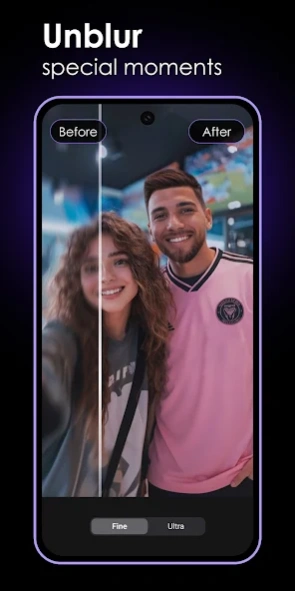
• AI Enhance — Fine & Ultra clarity modes
• Restore — Unblur & De-Scratch old photos
• AI & Creative Filters — styles, before/after, intensity control
• Stickers & Cutout — spirals, borders, wings, custom cutouts
• Refreshed UI, original-resolution saving, bug fixes
Update now & create sharper photos! 📸
Blur Photo Editor & Auto Blur version 7.4
Updated At: 2026-07-13
Changes: We’ve introduced powerful new AI tools and a refreshed design to elevate your portrait editing experience.
1. New AI sports,summer,movie filter.
2. Brand-new AI Filters for stunning transformations
3. Bug fixes.
Update now and experience smarter portrait editing with AI ✨
Blur Photo Editor & Auto Blur version 7.4
Updated At: 2026-04-01
Changes: We’ve introduced powerful new AI tools and a refreshed design to elevate your portrait editing experience.
1. New AI Enhance, Unblur & De-scratch tools
2. Brand-new AI Filters for stunning transformations
3. Redesigned Home, Editor, and Save/Share screens
4. Flexible access: Subscribe to PRO or watch ads to unlock premium features
5. Faster processing, clearer PRO labels, and smoother performance
Update now and experience smarter portrait editing with AI ✨
Blur Photo Editor & Auto Blur version 6.9
Updated At: 2025-03-26
Changes: Minor issue fixed.
Blur Photo Editor & Auto Blur version 3.3
Updated At: 2022-04-07
Changes: Human detection improved.
Minor issue fix.
Blur Photo Editor & Auto Blur version 2.8
Updated At: 2021-06-01
Changes: Human detection improved.
Android OS-11 support
Minor issue fix.
Blur Photo Editor & Auto Blur version 2.7
Updated At: 2021-05-09
Changes: Android OS-11 support
Performance improved.
Minor issue fix.
Blur Photo Editor & Auto Blur version 2.5
Updated At: 2021-04-08
Changes: Performance improved.
Minor issue fix.
Blur Photo Editor & Auto Blur version 2.3
Updated At: 2021-02-14
Changes: Object detection is more better.
Minor issue fix
Blur Photo Editor & Auto Blur version 1.3
Updated At: 2020-09-03
Changes: Minor bug fixing.
Disclaimer
Official Google Play Link
We do not host Blur Photo Editor & Auto Blur on our servers. We did not scan it for viruses, adware, spyware or other type of malware. This app is hosted by Google and passed their terms and conditions to be listed there. We recommend caution when installing it.
The Google Play link for Blur Photo Editor & Auto Blur is provided to you by apps112.com without any warranties, representations or guarantees of any kind, so access it at your own risk.
If you have questions regarding this particular app contact the publisher directly. For questions about the functionalities of apps112.com contact us.